Sentry
紀錄及偵錯的工具
安裝
yarn add @sentry/react
npx @sentry/wizard@latest -i sourcemaps
初始化
通常在專案最高層級的 component 或 script 裡初始化
- init config 有很多選擇,請參閱官網
// init
import * as Sentry from "@sentry/react";
Sentry.init({
    dsn: process.env.REACT_APP_SENTRY_DSN, // sentry 給的 private token
    integrations: [
      new Sentry.BrowserTracing({
        // Set 'tracePropagationTargets' to control for which URLs distributed tracing should be enabled
        tracePropagationTargets: ['localhost', /^https:\/\/yourserver\.io\/api/],
      }),
      new Sentry.Replay(),
    ],
    // Performance Monitoring
    tracesSampleRate: 1.0, // Capture 100% of the transactions
    // Session Replay
    replaysSessionSampleRate: 0.1, // This sets the sample rate at 10%. You may want to change it to 100% while in development and then sample at a lower rate in production.
    replaysOnErrorSampleRate: 1.0, // If you're not already sampling the entire session, change the sample rate to 100% when sampling sessions where errors occur.
  });
其他
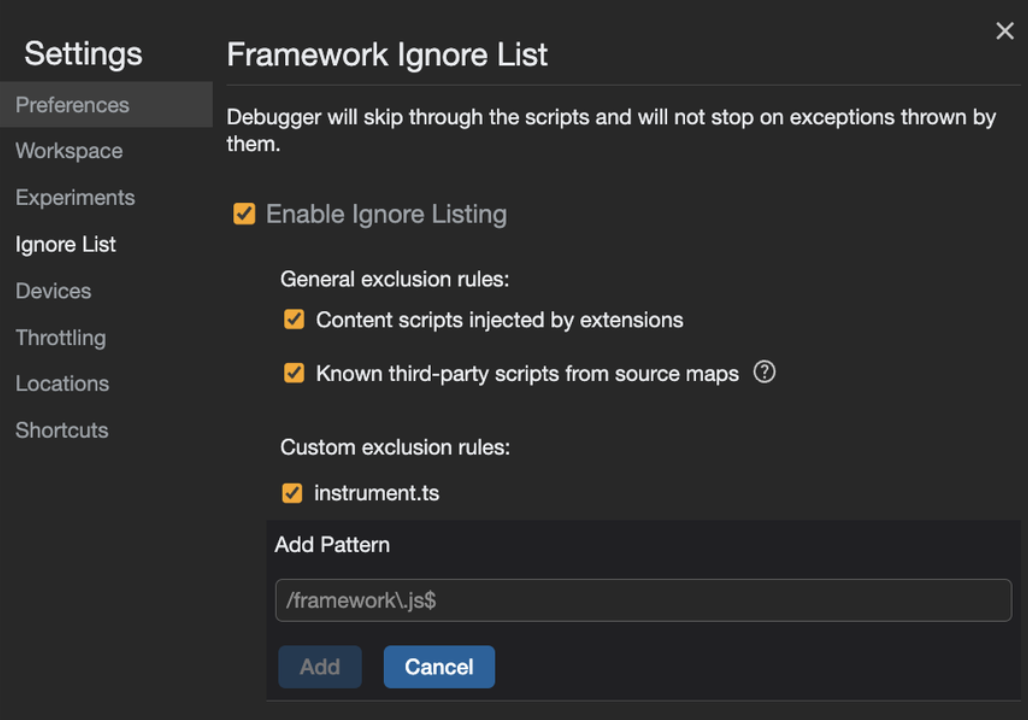
裝了 sentry 後, Dev Tool 的 Source 統一變成 instrument.js,沒辦法看出實際來自哪個檔案 https://github.com/getsentry/sentry-react-native/issues/794
解決方式:chrome dev tool setting add ignore list